
Session Mode on Android
このコンテンツはまだ日本語訳がありません。
Everything specific to Session Mode on Android: the Upscore watch app for Wear OS, which heart-rate monitors work, how to get other smartwatches broadcasting, and where Health Connect fits in.
What can I use for heart rate on Android?
Section titled “What can I use for heart rate on Android?”Three options, and you can switch between them whenever you like:
- The Upscore watch app, on any Wear OS watch
- Chest straps and armbands — Polar H9/H10, Polar Verity Sense, Polar OH1, Garmin HRM, Wahoo TICKR, Coospo, Scosche Rhythm, Magene, Myzone and other bands that broadcast your heart rate through Bluetooth
- Other smartwatches that can broadcast: Fitbit Charge 6 and Garmin watches, but only after you turn broadcasting on. See Can I use a smartwatch without the Upscore watch app?
You pick one as your active source in Profile → Connected devices → Heart Rate Source, or on the pre-session screen right before you play.
Do I need a smartwatch?
Section titled “Do I need a smartwatch?”No. A Bluetooth chest strap works just as well as a smartwatch.
Does my watch work with the Upscore watch app?
Section titled “Does my watch work with the Upscore watch app?”Upscore supports Wear OS 3 or later. That covers:
- Pixel Watch, every generation
- Galaxy Watch 4 and newer, including the Ultra and FE models
- Other Wear OS 3+ watches (OnePlus Watch 2 and 3, TicWatch Pro 5 and others)
The quickest check: open the Play Store on the watch and look under Apps on your phone. If Upscore is listed there, your watch is supported.
Which watches don’t run the Upscore watch app?
Section titled “Which watches don’t run the Upscore watch app?”- Galaxy Watch 3, Galaxy Watch Active 2 and older. Those run Samsung’s Tizen, not Wear OS, and there is no way to get heart rate out of them into Upscore.
- Wear OS 2 watches such as the Fossil Gen 5 and older TicWatch models. The watch app needs Wear OS 3.
- Fitbit trackers and watches (Charge 6, Versa, Sense, Inspire). These aren’t Wear OS. The Charge 6 can still broadcast its heart rate to Upscore; see below. The others can’t.
- Garmin, Polar, Coros, Amazfit and other non-Wear OS watches. Many of these can broadcast heart rate over Bluetooth instead, which works fine. See Can I use a smartwatch without the Upscore watch app?
- A Wear OS watch paired to an iPhone. The watch app talks to Upscore on your Android phone, so it needs one.
- Apple Watch. That’s the iPhone page.
How do I install Upscore on my watch?
Section titled “How do I install Upscore on my watch?”Install Upscore on your phone first, from Google Play. You can install the Wear OS app by following the instructions in the app, or from the Play Store on your watch.
- Open Profile → Connected devices.
- Under Heart Rate Source, tap your watch’s row. It’s named after your watch (for example Pixel Watch 3) and says Set up on your watch.
- Tap Open Play Store on your watch. The Play Store opens on the watch, not on the phone.
- On the watch, tap Install.
- Open Upscore on the watch and allow heart rate when it asks. If it never asks, turn it on in the watch’s settings.
- Back on the phone, the row shows Ready with your live heart rate.
Nothing happened on the watch? Install it from the watch instead: press the crown, open the Play Store, scroll to Apps on your phone, and tap Install next to Upscore.
Upscore isn’t under “Apps on your phone” on my watch
Section titled “Upscore isn’t under “Apps on your phone” on my watch”Most often the phone’s copy of Upscore is out of date. In order:
- Update Upscore on your phone from Google Play. Versions before September 2026 had no watch app for the Play Store to offer.
- Check the watch runs Wear OS 3 or later. A Wear OS 2 or Tizen watch never lists it, and can’t run it.
- Same Google account. The watch’s Play Store lists phone apps for the account the watch is signed into.
- Give the watch an internet connection. Wi-Fi on the watch is the sure route; downloads through the phone’s connection can be slow or stall.
- Restart the watch and open its Play Store again. It can take a few minutes after a phone update for the list to catch up.
Do I need to sign in on the watch?
Section titled “Do I need to sign in on the watch?”No. There’s no account, password or code to enter on the watch. It picks up who you are from Upscore on your phone, and shows your DDR code on its start screen so you can check it’s recording as the right player.
Do I pair the watch in Upscore?
Section titled “Do I pair the watch in Upscore?”No pairing needed. Your watch is already paired to your phone through the Pixel Watch, Galaxy Wearable or Wear OS app, and Upscore uses that link. There’s no Bluetooth scan and nothing to accept. Once the watch app is installed, pick your watch’s row under Heart Rate Source and you’re set.
The row tells you where things stand:
- Set up on your watch: the watch is paired but Upscore isn’t installed on it yet.
- Open Upscore on your watch: installed, but not open. Tap the row and Upscore opens it for you.
- Ready, with a heart rate: the watch is reading and you’re good to go.
- Paired, not nearby: the phone can’t reach the watch right now. Bring the two together, and check Bluetooth is on and the watch is unlocked.
How do I start a session with the watch?
Section titled “How do I start a session with the watch?”Either end works.
- From the phone. Start a session as usual with your watch selected as the heart-rate source. Upscore opens the watch app and starts it for you. If the watch asks Start tracking?, tap Start on it.
- From the watch. Press the crown, open Upscore, and tap Let’s DDR. After a 3-2-1 countdown you’re recording, and your phone gets a “Session started on your watch” notification.
Session Mode is an Upscore Pro feature with your first three sessions free, the same on the watch as on the phone.
What does the watch show during a session?
Section titled “What does the watch show during a session?”Your heart rate in its zone colour, the zone name, and the elapsed time. Turn the crown or swipe up for a second page with your average, peak and calories. Swipe left for the controls: Lock, Pause and End.
When you lower your wrist the screen dims to a black page with your heart rate and the minutes elapsed. Raise it and the full display comes back. Your watch face also gets a small Upscore chip with your BPM and timer while a session runs; tap it to get back into the app.
Want the screen to stay bright? On the watch’s start screen, open Settings and turn on Keep screen on. It costs battery, which is why it’s off by default.
Can I stop sweat from tapping things on the watch?
Section titled “Can I stop sweat from tapping things on the watch?”Yes, tap Lock on the controls page. The screen ignores touches until you turn the crown to unlock. Your heart rate keeps showing while it’s locked.
Can I pause?
Section titled “Can I pause?”Yes. Tap Pause on the watch’s controls page, or the pause button on the phone; whichever you use, both sides pause together and both show Paused. Paused time doesn’t count toward your session length.
How do I end the session?
Section titled “How do I end the session?”On either device. On the watch, swipe to the controls page, tap End, then confirm with the green check. The watch shows your total time, average and peak heart rate, and calories, then Done. Ending on the phone stops the watch too.
Your recap is built on the phone. Open Upscore there after the session to see it.
The watch says “Searching for phone”
Section titled “The watch says “Searching for phone””The watch has lost its link to your phone. Bring the two within a few metres of each other, check Bluetooth is on and the phone is unlocked, and it reconnects on its own. Keep them together for the rest of the session, and check your recap afterwards: heart rate from the time they were apart may be missing.
My phone says “Waiting for your watch… if it asks, tap Start on it”
Section titled “My phone says “Waiting for your watch… if it asks, tap Start on it””Look at the watch. It should be showing Start tracking? with a Start button. Tap it.
If the phone then says Your watch didn’t respond:
- Open Upscore on the watch yourself (press the crown, find Upscore) and leave it on the start screen.
- Check the watch is nearby and Bluetooth is on on the phone.
- End the session on the phone and start again. Heart rate isn’t tracked for a session that started without the watch responding.
The watch says “End your other workout first”
Section titled “The watch says “End your other workout first””Your watch is already recording a workout in another app. Wear OS only allows one workout at a time: Fitbit Exercise on a Pixel Watch, Samsung Health on a Galaxy Watch, or anything else with a running timer. End it there, then start Upscore.
This is a Wear OS rule rather than an Upscore one, and it’s also why you can’t record the same session in both Upscore and your watch’s own fitness app.
Which permissions does the watch app need, and how do I turn them on?
Section titled “Which permissions does the watch app need, and how do I turn them on?”Heart rate is the only one that matters, and it’s the one behind “Upscore needs heart rate access” on the watch. The full list:
- Heart rate. Without it a session records no heart rate at all. Your watch files it under one of two names, which is the part that catches people out: Sensors on Wear OS 5 and older, Fitness and wellness on Wear OS 6 and newer. The Wear OS 5 pop-up doesn’t say heart rate anywhere, it asks about “sensor data about your vital signs”.
- Physical activity for the calorie estimate, and Notifications for the session chip on your watch face. Decline either and everything else still works.
To turn them on, on the watch: open Settings, tap Apps, tap Upscore, then Permissions. Some watches list the same thing as Settings → Apps & notifications → App permissions. Then tap the row and choose an answer.
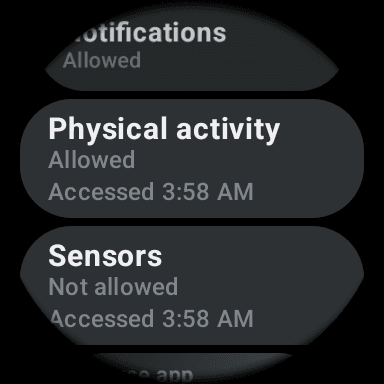
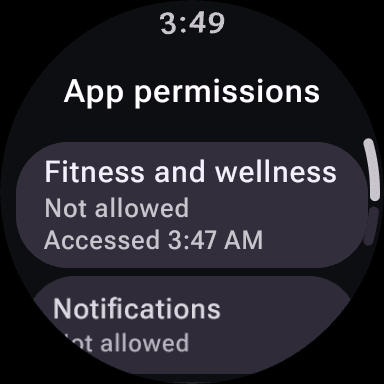
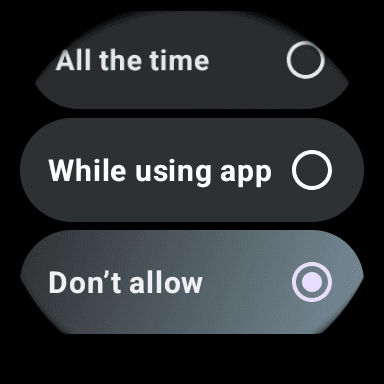
All the time is the one that covers a session you start from your phone, because the watch app gets woken in the background. Wear OS never offers it in a pop-up, so this screen is the only place it can be switched on.
The watch never asked, or it says “Upscore keeps stopping”
Section titled “The watch never asked, or it says “Upscore keeps stopping””Turn the permissions on yourself in the watch’s settings, using the steps above, then start the session again. Two things cause this, and both leave you with no pop-up to tap:
- Wear OS 4 and 5 can swallow the request. Upscore asks for both heart-rate permissions at once, and those versions grant neither and show nothing. That’s our bug rather than your watch. Wear OS 6 and newer aren’t affected in our testing.
- A permission you’ve already refused twice is remembered, so asking again does nothing at all. Android works this way for every app.
Without heart-rate access, a session started from the phone can also stop the watch app outright, which is the “Upscore keeps stopping” message.
The watch says “Tighten your band”
Section titled “The watch says “Tighten your band””The sensor lost contact with your skin. For a session, wear the watch snug and two to three finger widths above your wrist bone, which is Google’s own advice for exercise, and it picks up within a few seconds. A loose watch on a thin wrist is the number-one cause of gaps during DDR. -- before your first reading is normal; the watch is still finding your pulse.
The heart rate on my phone is a few seconds behind the watch
Section titled “The heart rate on my phone is a few seconds behind the watch”That’s by design. The watch reads your heart rate every second and sends it to the phone in batches every five seconds or so, which keeps the watch battery reasonable. The watch is always current; the phone catches up every few seconds, and your recap has every reading.
Can I use a smartwatch without the Upscore watch app?
Section titled “Can I use a smartwatch without the Upscore watch app?”Sometimes — it depends on whether your watch can broadcast its heart rate over Bluetooth. Most watches keep their heart rate to themselves and their own health app; broadcasting is a separate feature that some brands have and some don’t. Connected this way, your watch behaves like a chest strap: you connect it under Heart Rate Source and start sessions from the phone.
Upscore has these same instructions built in. Tap Using a smartwatch? on the Heart Rate Source screen.
Pixel Watch, without the Upscore watch app
Section titled “Pixel Watch, without the Upscore watch app”The watch app is the better route on a Pixel Watch. If you’d rather not install it:
- Swipe down from the watch face
- Tap Connected Fitness, then Connect
- In Upscore, select your Pixel Watch when it appears
- Accept the prompt on the watch when Upscore appears
Not showing up? On the watch, go to Settings → Connectivity → Connected Fitness → Allow more devices and turn on Extended pairing. Connected Fitness on a Pixel Watch 2 needs Wear OS 6 or later.
Fitbit Charge 6
Section titled “Fitbit Charge 6”- Swipe down from the clock face
- Tap HR on equipment
- In Upscore, select Fitbit Charge 6 when it appears
- Tap Share on the Charge 6 when it asks
Move quickly — the Charge 6 only broadcasts for a few seconds after you tap HR on equipment, and ending the workout stops the broadcast.
Garmin watches
Section titled “Garmin watches”- Hold the light button to open the controls menu
- Select the Broadcast Heart Rate icon
- Press start when prompted
- In Upscore, select your Garmin when it appears
If the icon isn’t there, look for Broadcast Heart Rate under Wrist Heart Rate in settings — the exact path varies by model. Broadcasting drains the battery faster, so stop it when you’re done.
Galaxy Watch, without the Upscore watch app
Section titled “Galaxy Watch, without the Upscore watch app”The Upscore watch app is the better route on a Galaxy Watch 4 or newer. If you’d rather not install it, the only other option is a bridge app installed on the watch, because Samsung hasn’t built heart-rate broadcasting into its watches or into Samsung Health:
- Open the Play Store on the watch (not the one on your phone)
- Install a bridge app such as Heart for Bluetooth
- Launch it before your session
- In Upscore, select your Galaxy Watch when it appears
Which devices don’t work at all?
Section titled “Which devices don’t work at all?”- Anything that doesn’t run Wear OS 3+ and doesn’t broadcast Bluetooth heart rate. If a device only syncs to its own app after a workout, Upscore can’t read it live. That includes most sleep-and-recovery style bands and rings.
- Older Fitbits. Broadcasting is a recent Fitbit feature; the Charge 6 has it, most earlier models don’t.
- Tizen Galaxy Watches (Watch 3, Active 2 and older). No watch app and no bridge app.
- ANT+-only devices. Upscore connects over Bluetooth. Many straps do both — if yours has a Bluetooth mode, use it.
Why does Upscore ask for Bluetooth and Location permission?
Section titled “Why does Upscore ask for Bluetooth and Location permission?”Bluetooth, to find and connect your monitor. Location is Android’s doing, not ours: on Android 11 and older the system requires the location permission for any Bluetooth scan, even when the app has no interest in where you are. On Android 12 and newer you’ll just see the Bluetooth permissions instead. Upscore doesn’t collect your location.
The Upscore watch app doesn’t need either of these on the phone. It uses the link your watch already has.
If you declined and want to fix it: Settings → Apps → Upscore → Permissions.
Do I need Health Connect?
Section titled “Do I need Health Connect?”No — it’s optional, and it’s about where your sessions go afterwards, not about heart rate coming in. With Health Connect set up, Upscore saves each finished session as a workout with your steps, heart rate and calories, so it shows up in Samsung Health, Google Health and anything else that reads Health Connect. That’s true whether the heart rate came from the watch app or a strap: the phone does the saving.
Every permission it asks for, why, how to change one you declined, and why a workout isn’t showing in Samsung Health or Google Health: Health Connect on Android.
Will the watch app drain my watch battery?
Section titled “Will the watch app drain my watch battery?”It’s built not to. The screen dims to a black page whenever your wrist is down, there are no looping animations while you’re not looking, and the watch batches what it sends to the phone. Two things do cost more: Keep screen on, and Battery Saver, which on most Wear OS watches kicks in around 15% and can cut background connections. Start a long session with a reasonable charge and leave Battery Saver off.
Can I use the watch app in Japanese?
Section titled “Can I use the watch app in Japanese?”Yes. The watch follows the language you’ve chosen in Upscore on your phone, not the watch’s own language setting, so a Japanese Upscore gets a Japanese watch app.
How do I update the watch app?
Section titled “How do I update the watch app?”The watch’s Play Store updates it on its own, usually overnight while the watch is charging. To check, open the Play Store on the watch and look under Manage apps. Updating Upscore on your phone doesn’t update the watch; they’re separate installs that update separately.
How do I remove the watch app?
Section titled “How do I remove the watch app?”On the watch, hold the Upscore icon in the app list and choose uninstall, or use Settings → Apps on the watch. Upscore on your phone keeps working and offers you the strap and broadcast options instead. Reinstall any time from the phone’s Connected devices row or the watch’s Play Store.
My watch was connected and then stopped mid-session
Section titled “My watch was connected and then stopped mid-session”For the Upscore watch app, the most common cause is the watch losing skin contact or the phone being out of range:
- “Tighten your band” on the watch: contact lost. Snug it up and it resumes on its own.
- “Searching for phone”: out of range. Bring the two back together and it reconnects on its own.
- Galaxy Watch: if Upscore keeps stopping in the background, check whether the watch has put it to sleep to save battery, and tell us on Discord. We haven’t seen this on a wrist yet and want to.
For a broadcasting watch, it’s usually the watch that stopped broadcasting rather than Upscore that lost it:
- Fitbit Charge 6: ending the workout on the watch stops the broadcast. Start again from the clock face.
- Garmin: broadcasting stops when you exit the broadcast screen or the watch times out.
- Galaxy Watch with a bridge app: the bridge app has to stay running.
- Battery saver on the watch or phone can cut Bluetooth connections. Turn it off before a session.
If none of these match, tell us on Discord and we can help troubleshoot.