Session Mode
このコンテンツはまだ日本語訳がありません。
What is Session Mode?
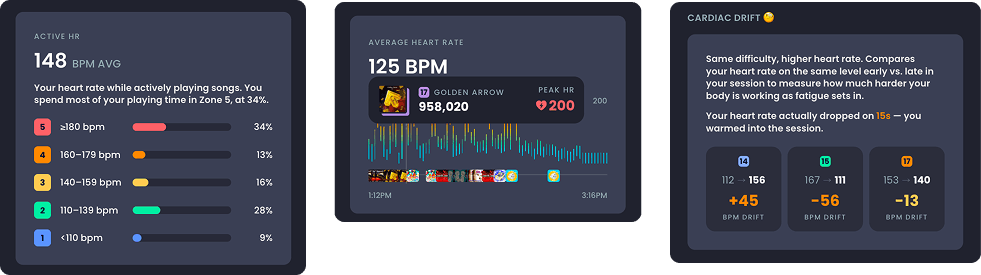
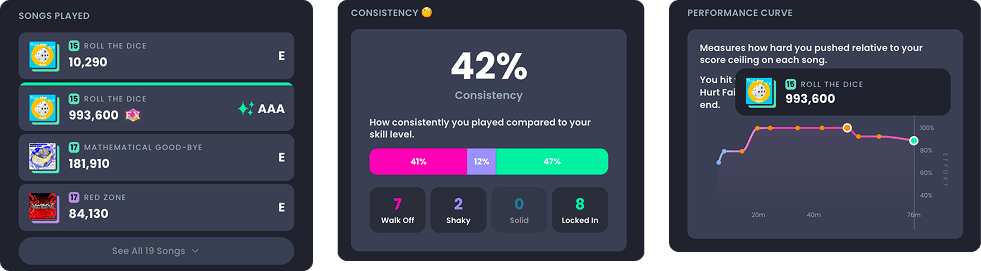
Section titled “What is Session Mode?”Start an Upscore session when you’re about to start gaming! When you start a session, Upscore creates a timestamp. When you end your session, your scores are automatically pulled so you can see what you played, new personal bests, consistency data and advanced analytics specific everything you played during your session.
Do I need a heart rate monitor to use Upscore?
Section titled “Do I need a heart rate monitor to use Upscore?”Nope. You can use Upscore’s session mode without a heart rate monitor. Upscore records your session, your songs, your scores and your personal bests even without a heart rate monitor. A monitor adds live BPM, heart-rate zones, calorie estimates and the per-song heart-rate chart in your session recap. It’s the difference between “here’s what you played” and “here’s how hard it was.”
What does Upscore actually track during a session?
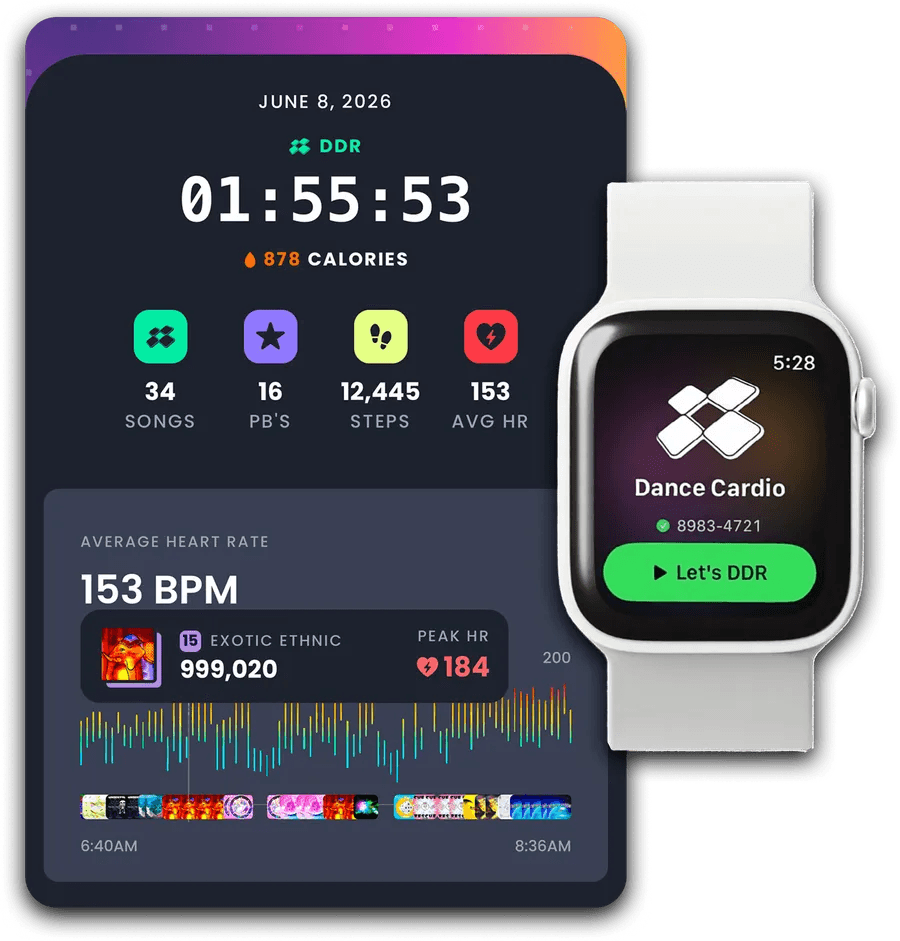
Section titled “What does Upscore actually track during a session?”Your songs and scores, session length, steps, estimated calories, and — if you have a heart-rate monitor connected — your heart rate through every song, your average and peak BPM, and the time you spent in each heart rate zone. More analytics are being added regularily too.
Is heart rate tracking free?
Section titled “Is heart rate tracking free?”Session Mode is an Upscore Pro+ feature. Your first three sessions are free to try.
Where do I set up my heart rate monitor?
Section titled “Where do I set up my heart rate monitor?”Two places, and they do the same thing:
\
- Profile → Connected devices — set it up ahead of time
- Right before a session — the pre-session screen has the same picker built in, so you can connect while you’re strapping in
\
Whichever you use, Upscore remembers your monitor and reconnects to it automatically next time.
\
On iPhone: Connected devices is also where you manage Apple Health settings.
On Android: Connected Devices is where you manage Health Connect settings.
Can I connect more than one heart rate monitor at a time?
Section titled “Can I connect more than one heart rate monitor at a time?”No. Upscore uses one heart-rate source at a time, and picking a new one disconnects the old one. This isn’t an Upscore limitation so much as a Bluetooth one: most straps and watches can only stream to one app at a time, and every fitness app we know of works the same way.
\
If you have both an Apple Watch and a chest strap, choose whichever you’d like to use as a heart rate monitor,
Do I pair my monitor in Upscore, or in my phone’s Bluetooth settings?
Section titled “Do I pair my monitor in Upscore, or in my phone’s Bluetooth settings?”In Upscore. Your phone’s Bluetooth settings screen usually won’t show a heartrate strap at all, and if you did manage to pair it there it can actually stop Upscore from connecting, because the strap is then busy talking to the operating system.
\
If you’ve already paired it in your phone’s Bluetooth settings, remove/forget it there first, then connect it in Upscore.
My monitor isn’t in the list. Where is it?
Section titled “My monitor isn’t in the list. Where is it?”Upscore filters the scan down to things that look like heart-rate monitors, so your speaker and your neighbour’s TV don’t clutter it up. If your monitor has an unusual name it can get filtered out too. Tap Don’t see your monitor? Show all devices at the bottom of the list to see everything nearby.
\
Also worth checking, in this order:
\
- Is it awake? Most chest straps only start broadcasting once they detect a heartbeat. Put it on, wet the contacts, and give it a few seconds.
- Is it already connected to something else? A strap can only talk to one app at a time — close the manufacturer’s app (Polar Flow, Wahoo, Garmin Connect), and disconnect it from any watch or gym equipment.
- Is Bluetooth on? Upscore will tell you if it isn’t, but it’s worth a look.
- Tap rescan (the ↻ icon next to Heart Rate Source) and give it a few seconds.
It says “Not nearby” next to my monitor
Section titled “It says “Not nearby” next to my monitor”That’s your remembered monitor — Upscore keeps it pinned at the top of the list even when it can’t see it, so you don’t have to hunt for it again. t means the monitor is off, out of range, asleep, or connected to another app. Wake it up and tap rescan.
What happens if my monitor drops out mid-session?
Section titled “What happens if my monitor drops out mid-session?”The session keeps going. Upscore keeps recording your songs and scores, and the heart-rate line in your recap will just have a gap where the signal dropped. Upscore tries to reconnect on its own; if the monitor comes back, the chart picks up again.
If you take off your heart rate monitor during your session, you may need to reconnect it through the session UI for your heart rate to read again. If you remove your heart rate monitor for an extended period of time and cannot reconnect, stop your current session and start a new one.
My heart rate reads as —
Section titled “My heart rate reads as —”That means Upscore is connected but hasn’t received a beat yet. It usually resolves within a few seconds of the strap making good contact with your skin. If it stays on —:
\
- Wet the electrodes. Dry contacts are the number-one cause of no reading. A dab of water on the two contact strips, or just wait until you’ve worked up a sweat.
- Check the fit. Snug, directly against skin, on the sternum — below the pectorals, or right below a sports bra band. A loose strap slides and loses contact.
- Check the battery. Most chest straps take a CR2032 coin cell.
My heart rate looks wrong — spiky, or way too high
Section titled “My heart rate looks wrong — spiky, or way too high”Almost always a contact or interference problem rather than a broken monitor:
\
- Dry skin or a loose strap produces erratic spikes. Wet the electrodes, tighten the strap.
- Static from a loose shirt. In dry air, a fluttering shirt rubbing the strap generates static the sensor reads as beats. A snugger top or a cotton shirt fixes it.
- Wrist-based monitors are less accurate during dance. The repeated impact and wrist movement in DDR is close to a worst case for optical wrist sensors. If your numbers look implausible on a watch, a chest strap will be dramatically more consistent.
- Distance and body-blocking. Bluetooth’s 2.4 GHz signal doesn’t pass through your body well. Keep your phone in front of you (in a pocket, on the cabinet, not behind your back) and within a few feet.
Where is my heart rate data stored? Can I turn it off?
Section titled “Where is my heart rate data stored? Can I turn it off?”Upscore stores your heart-rate data on our servers so we can show you detailed session analytics, comparing your heart rate against the scores in each session. It’s never sold, never used for ads, and never shared. You can turn it off any time in Settings.
\
On iOS: Separately, Upscore writes your workout, steps and calories to Apple Health, which stays on your device unless you’ve turned on iCloud sync for Health.
\
On Android: Separately, Upscore can write your workouts to Health Connect, which stays on your phone.
Does Upscore work on the web?
Section titled “Does Upscore work on the web?”Session recording and device connection are app-only. They need Bluetooth and a background connection the browser can’t give us. The web app is for browsing your scores and history.
\
3. iPhone tab
Section titled “3. iPhone tab”What can I use for heart rate on iPhone?
Section titled “What can I use for heart rate on iPhone?”Two options, and you can switch between them whenever you like:
\
- Apple Watch — no extra hardware, and it’s the one-tap option. Your session shows up in Apple Health and counts toward your Activity rings.
- A Bluetooth heart-rate monitor — any standard Bluetooth chest strap or armband (Polar, Garmin, Wahoo, Coospo, Scosche and others). More accurate than a wrist sensor during heavy footwork.
\
You pick one as your active source in Profile → Connected devices → Heart Rate Source.
Do I need an Apple Watch?
Section titled “Do I need an Apple Watch?”No. A Bluetooth chest strap works just as well and — during DDR specifically — usually reads more accurately, because wrist sensors struggle with the impact and arm movement.
How do I set up the Upscore Apple Watch app?
Section titled “How do I set up the Upscore Apple Watch app?”- Install Upscore on your iPhone.
- Open the Watch app on your iPhone.
- Find Upscore in the list and tap Install (or turn on Automatic App Install and it arrives on its own).
- Open Upscore on your watch and allow the Health permissions it asks for.
Needs watchOS 10 or later.
Can I start a session from my watch?
Section titled “Can I start a session from my watch?”Yes. Open Upscore on your Apple Watch and start from there — your phone doesn’t need to be in your hand. Your DDR code shows on the watch’s start screen so you can check you’re recording as the right player.
What is the Live Activity / Dynamic Island thing?
Section titled “What is the Live Activity / Dynamic Island thing?”While a session is running, Upscore puts your session on your Lock Screen and in the Dynamic Island at the top of your screen, so you can glance at it without unlocking your phone or opening the app. It shows your current heart rate, your heart-rate zone, calories, and elapsed time. ✅
\
It updates every few seconds while you play. ✅ And it works with whichever heart-rate source you’re using — Apple Watch or Bluetooth strap, it makes no difference. ✅
Why don’t I see the Live Activity or Dynamic Island?
Section titled “Why don’t I see the Live Activity or Dynamic Island?”A few things it needs:
\
- iOS 18 or later. ⚠️ (see §7 — this is what the widget target is set to today, worth confirming before publishing)
- Live Activities turned on. iPhone Settings → Upscore → Live Activities.
- The Dynamic Island specifically needs the hardware for it — iPhone 14 Pro and later. On other iPhones you still get the Lock Screen version, which shows the same information.
- A session has to actually be running. It appears when you start a session and disappears when you end it.
It says “CONNECTING…” and — where my heart rate should be
Section titled “It says “CONNECTING…” and — where my heart rate should be”That’s the Live Activity’s normal starting state — the session has begun, but no heart-rate reading has arrived yet. ✅ If it stays that way, your source isn’t streaming: check the Apple Watch is on your wrist and Upscore is open on it, or that your strap is worn and awake.
Do I need Apple Health? What does Upscore put in it?
Section titled “Do I need Apple Health? What does Upscore put in it?”You need Apple Health if you want to use your Apple Watch as the heart-rate source — the watch’s heart rate reaches your phone through Health. ✅ If you’re using a Bluetooth strap, Apple Health is optional.
\
When it’s connected, Upscore writes your workouts, steps and calories to Apple Health. ✅ That’s what makes your DDR sessions count toward your Exercise ring. ✅
\
You can review or change exactly what Upscore shares at Settings → Health → Data Access & Devices → Upscore. ✅
My steps aren’t showing up in Apple Health
Section titled “My steps aren’t showing up in Apple Health”This is a known Apple Health behaviour, not an Upscore bug — Health picks one source for steps to avoid double-counting, and your iPhone usually wins by default. To make Upscore’s steps count during a session:
\
- Open the Apple Health app
- Browse → Steps → Data Sources & Access → Edit
- Drag Upscore above iPhone ✅
Can I use a chest strap with my iPhone instead of the watch?
Section titled “Can I use a chest strap with my iPhone instead of the watch?”Yes. Go to Profile → Connected devices, tap rescan under Heart Rate Source, and pick your strap from the list. ✅ Everything else behaves identically — the session, the recap chart, the Live Activity and the Dynamic Island all show your strap’s heart rate. ✅
I have both an Apple Watch and a chest strap. Which one does Upscore use?
Section titled “I have both an Apple Watch and a chest strap. Which one does Upscore use?”Whichever you’ve selected as your Heart Rate Source — only one is active at a time. ✅ Change it any time in Profile → Connected devices; the switch takes effect from your next session.
Which iPhones and watches are supported?
Section titled “Which iPhones and watches are supported?”- iPhone: iOS 16 or later ✅
- Apple Watch app: watchOS 10 or later ✅
- Live Activity / Dynamic Island: ⚠️ see §7
- Bluetooth heart-rate monitors: any iPhone that runs Upscore
Why is Upscore asking for Bluetooth permission?
Section titled “Why is Upscore asking for Bluetooth permission?”Only to find and connect your heart-rate monitor. If you decline, everything else in Upscore still works — you just won’t be able to connect a strap. If you declined by accident, turn it back on at Settings → Upscore → Bluetooth. ✅
Can I use my Apple Watch as the source without wearing my phone?
Section titled “Can I use my Apple Watch as the source without wearing my phone?”Your iPhone needs to be with you and running Upscore for the session to record — it’s the phone that captures your scores. The watch handles heart rate and the start button.
\
⚠️ See §7 — I want to confirm the exact behaviour when the watch goes out of range of the phone mid-session before this answer ships.
\
4. Android tab
Section titled “4. Android tab”What can I use for heart rate on Android?
Section titled “What can I use for heart rate on Android?”Any heart-rate monitor that broadcasts over Bluetooth. That’s the whole rule, and it’s worth understanding because it’s what decides whether your device works:
\
- Chest straps and armbands — Polar H9/H10, Polar Verity Sense, Polar OH1, Garmin HRM, Wahoo TICKR, Coospo, Scosche Rhythm, Magene, Myzone and equivalents. These broadcast by default, and they’re the most accurate option for dance. ✅
- Some smartwatches — but only after you turn broadcasting on, and the steps are different on every brand. See the next question.
\
There’s no Upscore watch app for Wear OS. Your watch connects to Upscore as a heart-rate monitor, not as a companion app. ✅
Can I use my smartwatch?
Section titled “Can I use my smartwatch?”Sometimes — it depends on whether your watch can broadcast its heart rate over Bluetooth. Most watches keep their heart rate to themselves and their own health app; broadcasting is a separate feature that some brands have and some don’t.
\
Upscore has step-by-step instructions built into the app for the common ones. Tap Using a smartwatch? on the Heart Rate Source screen. ✅ Here’s the short version:
\
Pixel Watch 2 / 3 / 4 ✅
\
- Swipe down from the watch face
- Tap Connected Fitness, then Connect
- In Upscore, select your Pixel Watch when it appears
- Accept the prompt on the watch when Upscore appears
\
Not showing up? On the watch, go to Settings → Connectivity → Connected Fitness → Allow more devices and turn on Extended pairing. Pixel Watch 2 needs Wear OS 6 or later.
\
Fitbit Charge 6 ✅
\
- Swipe down from the clock face
- Tap HR on equipment
- In Upscore, select Fitbit Charge 6 when it appears
- Tap Share on the Charge 6 when it asks
\
Move quickly — the Charge 6 only broadcasts for a few seconds after you tap HR on equipment, and ending the workout stops the broadcast.
\
Garmin watches ✅
\
- Hold the light button to open the controls menu
- Select the Broadcast Heart Rate icon
- Press start when prompted
- In Upscore, select your Garmin when it appears
\
If the icon isn’t there, look for Broadcast Heart Rate under Wrist Heart Rate in settings — the exact path varies by model. Broadcasting drains the battery faster, so stop it when you’re done.
\
Galaxy Watch (Samsung) ✅ Galaxy Watches can’t broadcast heart rate on their own, and Samsung Health has no setting for it. The only route is a bridge app installed on the watch:
\
- Open the Play Store on the watch (not the one on your phone)
- Install a bridge app such as Heart for Bluetooth
- Launch it before your session
- In Upscore, select your Galaxy Watch when it appears
\
Works on Watch 4 and newer, including Watch Ultra.
Why does my Galaxy Watch need a third-party app when other watches don’t?
Section titled “Why does my Galaxy Watch need a third-party app when other watches don’t?”Because Samsung hasn’t built heart-rate broadcasting into Wear OS on their watches or into Samsung Health. ✅ Pixel, Garmin and the Charge 6 each ship the feature themselves; Samsung doesn’t, so a small bridge app on the watch does the broadcasting instead. It’s an extra step, but once it’s installed you just launch it before you play.
Which devices don’t work?
Section titled “Which devices don’t work?”Worth stating plainly, because these come up a lot:
\
- Anything that doesn’t broadcast Bluetooth heart rate. If a device only syncs to its own app after a workout, Upscore can’t read it live — that includes most sleep-and-recovery style bands and rings.
- Older Fitbits. Broadcasting is a recent Fitbit feature; the Charge 6 has it, most earlier models don’t. ⚠️ see §7 — worth confirming the current Fitbit model list before publishing
- Galaxy Watch without a bridge app. See above.
- ANT+-only devices. Upscore connects over Bluetooth. Many straps do both — if yours has a Bluetooth mode, use it.
Why does Upscore ask for Bluetooth and Location permission?
Section titled “Why does Upscore ask for Bluetooth and Location permission?”Bluetooth, to find and connect your monitor. Location is Android’s doing, not ours: on Android 11 and older the system requires the location permission for any Bluetooth scan, even when the app has no interest in where you are. ✅ On Android 12 and newer you’ll just see the Bluetooth permissions instead. Upscore doesn’t collect your location.
\
If you declined and want to fix it: Settings → Apps → Upscore → Permissions.
Do I need Health Connect?
Section titled “Do I need Health Connect?”No — it’s optional, and it’s about where your sessions go afterwards, not about heart rate coming in. ✅ With Health Connect set up, Upscore saves each finished session as a workout with your steps, heart rate and calories, so it shows up in Samsung Health, Google Health and anything else that reads Health Connect. ✅
\
You’ll need the Health Connect app from Google Play if your phone doesn’t already have it. ✅
My Upscore workouts aren’t showing in Samsung Health
Section titled “My Upscore workouts aren’t showing in Samsung Health”Samsung Health needs to be connected to Health Connect once, on its side:
\
- Open Samsung Health
- Tap Menu, then the Settings gear
- Under Connected apps and services, tap Health Connect
- Allow Exercise, Steps and Heart rate ✅
\
Workouts can take a minute to appear, and Samsung Health is slower to pick up new data on Android 13 and older. If nothing shows, turn its Health Connect access off and back on. Your workouts stay in Health Connect either way, so Google Health can still read them. ✅
My DDR steps aren’t counting toward my daily total
Section titled “My DDR steps aren’t counting toward my daily total”Health Connect picks one app as the priority source for steps, and your phone’s built-in counter usually wins. To put Upscore first:
\
- Open Health Connect settings
- Tap Manage data
- Tap Data sources and priority
- Choose Activity, then drag Upscore to the top ✅
Why does Upscore ask for my weight?
Section titled “Why does Upscore ask for my weight?”Only to estimate calories, and only if Health Connect doesn’t already know it. Your weight is saved on your phone — it’s never uploaded and never leaves your device. ✅ It’s optional; skip it and you’ll still get everything else.
My watch was connected and then stopped mid-session
Section titled “My watch was connected and then stopped mid-session”The most common cause on Android is that the watch stopped broadcasting rather than that Upscore lost it:\
- Fitbit Charge 6: ending the workout on the watch stops the broadcast. Start again from the clock face. ✅
- Garmin: broadcasting stops when you exit the broadcast screen or the watch times out.
- Galaxy Watch: the bridge app has to stay running.
- Battery saver on the watch or phone can cut Bluetooth connections. Turn it off before a session.