
Syncing scores
Upscore pulls in scores from multiple score providers so you’re always seeing your highest and best score, no matter where you play.
To start, visit the Upload tab and view Manage scores.
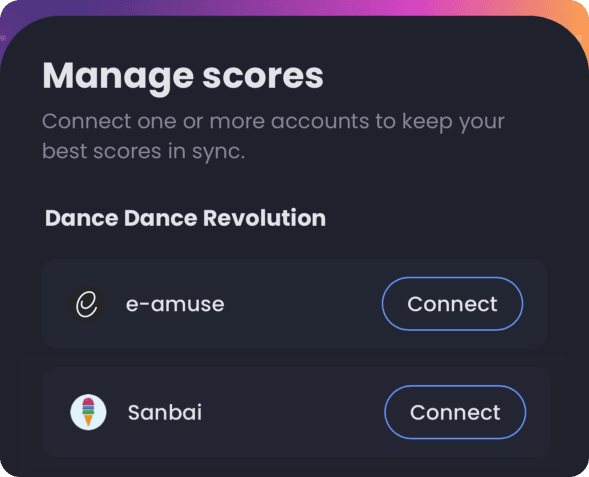
Which one should I connect?
Section titled “Which one should I connect?”e-amusement for your latest and greatest official scores. Upscore signs in to the e-amusement website as you and reads the scores Konami has on file. You will be asked to enter your e-amusement username and password; this is just to authenticate into e-amuse. Upscore never sees or stores your password!
Sanbai, if you already track there. Sanbai is a very popular score tracker for DDR players. If your history lives there, connecting it brings that history across. If you tracked scores with previous versions such as A3 or A20, those scores will import into Upscore too.
You can connect both. Upscore keeps the best score for each chart, so an older result from one account will not overwrite a better one from the other.
Connecting e-amuse
Section titled “Connecting e-amuse”Two things have to be true before this works: an active Basic Course, and the iOS or Android app.
- Check that your e-amusement account has an active Basic Course. Without it, everything below works and no scores arrive.
- Open Upscore on your phone and go to the Upload tab.
- On Manage scores, find the e-amuse row and tap Connect.
- Sign in with your Konami ID when the e-amusement site opens.
The row then shows Connected as your DDR code, and the first sync starts on its own. A long history takes a few minutes to come across.
Connecting Sanbai
Section titled “Connecting Sanbai”- Go to the Upload tab, then Manage scores.
- Find the Sanbai row and tap Connect.
- Approve the connection when Sanbai asks for it.
Sanbai is the one you can connect from a browser, if the phone is not to hand.
What happens after the first sync?
Section titled “What happens after the first sync?”Your scores appear under Scores, and the rest of Upscore switches on around them:
- Sessions record what you play and turn it into per-song stats and new personal bests.
- Goals track a target you choose, like AAA on every 15, and fill in as you play.
- LIFE4 works out the rank you are on and what is left to clear.
- Edi, your coach, can answer questions about your scores, because it can finally see them.
You do not need to sync by hand after this. Upscore refreshes in the background, and Sync now on a provider row forces it when you want a result in front of you straight away.
My scores didn’t come through
Section titled “My scores didn’t come through”Check Basic Course first. It is the most common cause by a distance, and the connection looks perfectly healthy without it.
Then, in order:
- Is it still connected? A row reading Session expired · Tap to reconnect means Konami signed you out. Tap it and sign in again, in the app.
- Did you play on a different DDR code? Upscore reads the code the connected account plays on. Scores from another card are not on that account.
- Give the first sync a few minutes. A long score history does not arrive all at once.
- Tap Sync now on the row and watch for a result.
If the row is connected, Basic Course is active, and Sync now still brings nothing back, tell us on Discord and we can help troubleshoot.